

Learn Japanese with flashcards, free on iPhone
Hinto is a free iPhone flashcard app with ready-made decks for every JLPT level and every jōyō kanji, and it turns a photo of your textbook into flashcards. It schedules your reviews with spaced repetition, so a few minutes a day is enough. No ads, no account.

- 8,446 JLPT words, N5 to N1
- 2,136 kanji, by school grade then jōyō
- Any page of your textbook, as cards
- Free no ads, no account
JLPT vocabulary flashcards, N5 to N1
One deck per JLPT level, built from Jonathan Waller’s JLPT lists with readings and meanings from the JMdict dictionary. Each card has the word, its kana reading and the English meaning. Open Discover in Hinto and follow the JLPT path from N5 up; the path shows where you are and what comes next.
| Deck | Words | What it covers |
|---|---|---|
| JLPT N5 See the full N5 list | 683 | Everyday basics: greetings, numbers, time, common verbs. |
| JLPT N4 | 648 | Daily life and simple conversation. |
| JLPT N3 | 1,834 | The bridge from textbook Japanese to real Japanese. |
| JLPT N2 | 1,835 | News, work and most of what you read day to day. |
| JLPT N1 | 3,446 | Abstract, formal and written Japanese. |
Kanji flashcards
The 1,026 kanji Japanese children learn in grades 1 to 6, then the rest of the 2,136 jōyō kanji in three parts, split by how common they are. The front shows the kanji; the back has its on and kun readings and up to three example words. Turn the card around and it asks you to write the kanji from the example word, with the kanji left blank: _月(いちがつ).
- Grade 1 80
- Grade 2 160
- Grade 3 200
- Grade 4 202
- Grade 5 193
- Grade 6 191
- Jōyō part 1 370
- Jōyō part 2 370
- Jōyō part 3 370
Make flashcards from your textbook
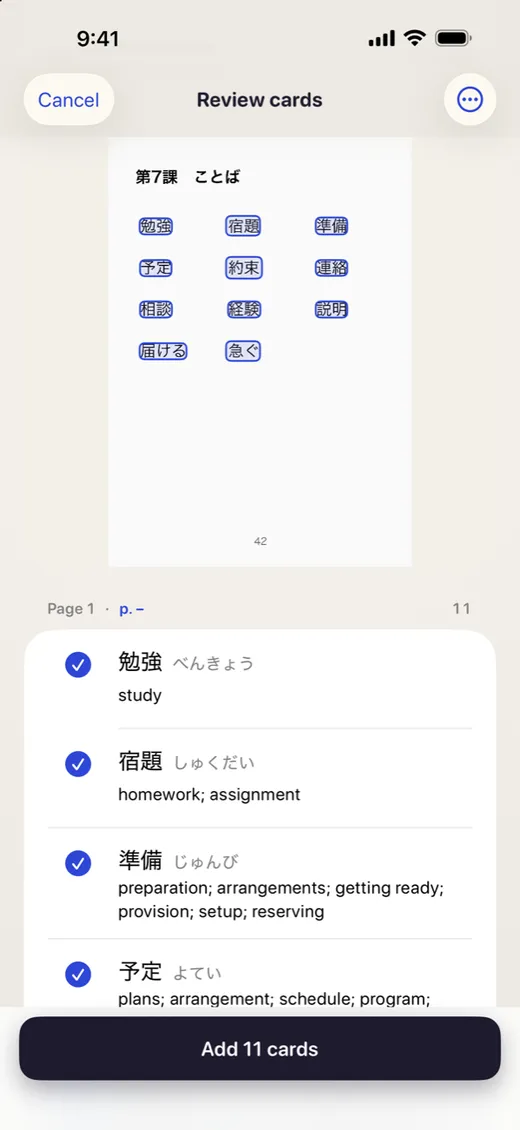
Ready-made decks are a good start, but the words you remember are the ones you meet in what you study. Scan a page of your textbook, a worksheet, a menu or a manga panel, or open a PDF. Hinto reads the page on your iPhone and drafts a card for every word, with the reading and meaning filled in.
- Tap Create → Scan pages and photograph the page.
- Check the cards Hinto found. Fix or leave out any you like.
- Add them to a deck and study them with everything else.
Works with any textbook. Hinto isn’t affiliated with any publisher, and your scans stay on your phone.
How studying works
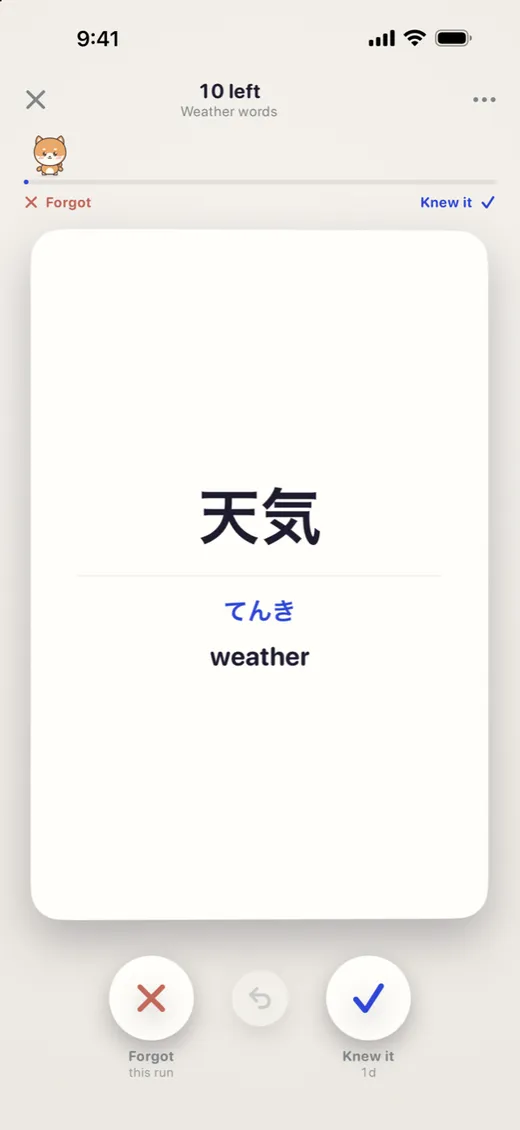
Spaced repetition. Hinto uses FSRS, a modern scheduling algorithm, to show each card again just before you’d forget it. Cards you know come back less and less often.
Short runs. A run is about 30 cards from one deck: some due for review, some new. Flip the card, then swipe right if you knew it, left if you forgot.
A gentle streak. Every day you finish a run gets a stamp. Miss a day and your stamps stay; no guilt, no lost progress.
Quiz cards. Multiple-choice cards keep their options, like the JLPT’s own questions: 毎朝、公園で( )をしています.
Questions
Is Hinto free?
Yes. Hinto is free on iPhone, with no ads, no subscription and no account. All of the Japanese decks on this page are free too.
What is the best way to learn Japanese with flashcards?
Study a little every day rather than a lot once a week, and let spaced repetition decide when you see each card again. Learn words at your level (JLPT N5 first), make cards from what you are actually reading, and review in the direction you need: Japanese to English to read, English to Japanese to speak and write.
Can I make flashcards from my Japanese textbook?
Yes. Scan the page with your iPhone camera, or pick a photo or a PDF. Hinto reads the page and drafts a card for each word with its reading and meaning; you check them before they go into a deck. On an iPhone with Apple Intelligence it also finds questions and key facts. The page is read on your phone and never uploaded.
Does Hinto have hiragana and katakana flashcards?
Not as a ready-made deck yet. Every vocabulary card shows the kana reading, and you can type your own kana cards in a minute. If you are starting from zero, learn the kana first, then begin with JLPT N5 Vocabulary.
Is Hinto an Anki alternative?
For many learners, yes: it is free on iPhone, schedules reviews with spaced repetition, and comes with JLPT and kanji decks, so there is nothing to set up. Anki is more customisable, has thousands of shared decks and syncs to a computer; Hinto has no desktop app. You can bring cards over from Anki by exporting them as a text file and importing it into Hinto.
Does it work offline?
Yes. Studying and making cards work without a connection. You only need the internet to download a deck from Discover.
Is Hinto only for Japanese?
No. Cards work for any language or subject, and Hinto also has English decks from CEFR A1 to B2. The ready-made Japanese decks are the ones on this page.
Is there an Android version?
Not yet. Hinto is on iPhone (iOS 17 or later).